


TikTok moves fast. Blink and a trend is gone. Post too late and your video sinks. That is why smart creators use automation tools. They save time. They reduce stress. And they help you publish faster and smarter.
TLDR: TikTok automation tools help you create, edit, schedule, and post content faster. They cut down manual work and keep your account consistent. From auto captions to batch scheduling, these tools boost efficiency. If you want to grow without burnout, automation is your best friend.
Why Speed Matters on TikTok
TikTok rewards speed. Trends explode overnight. Sounds go viral in hours. If you are late, you miss the wave.
But posting fast does not mean rushing badly made videos. It means being prepared.
Automation helps you:
- Stay consistent
- Post at the best times
- Reuse content smartly
- Reduce burnout
Consistency builds trust. The algorithm loves active creators. Viewers do too.
What Are TikTok Automation Tools?
Automation tools are software that handle repetitive tasks for you. They still need your creativity. But they remove the boring stuff.
Think of them as your backstage team.
They can help with:
- Video editing
- Caption generation
- Hashtag suggestions
- Scheduling posts
- Analytics tracking
- Comment moderation
Instead of doing everything by hand, you click once. Done.
1. Auto Video Editing Tools
Editing takes time. Cutting clips. Adding subtitles. Syncing music. Adjusting transitions.
Automation editing tools simplify this process.
They offer:
- Auto scene detection
- One click transitions
- Preset templates
- AI music matching
Templates are magic. You pick a format. Drop in clips. The tool handles the structure.
This is perfect for:
- Product showcases
- Quotes videos
- Before and after edits
- Educational snippets

With batch editing, you can produce 10 videos in one sitting. That is content for a week or more.
2. Auto Captions and Subtitles
Most people watch TikTok without sound. That is huge.
If you skip captions, you lose viewers.
Automation tools can:
- Generate captions instantly
- Highlight keywords
- Animate text
- Translate into other languages
This boosts watch time. It also makes your content accessible.
You speak once. The tool types everything for you.
Simple. Powerful.
3. Hashtag and Caption Generators
Writing captions daily drains creativity. Hashtags can be confusing too.
Automation tools analyze:
- Trending topics
- Your niche
- Competitor posts
- Engagement data
Then they suggest optimized captions and hashtags.
You should still tweak them. Add personality. But starting from a strong base saves time.
Less guessing. More strategy.
4. Scheduling Tools for Batch Posting
Posting manually every day is stressful.
Schedules fix that.
You can:
- Create content in batches
- Upload multiple videos at once
- Select future dates and times
- Auto publish while you sleep
This keeps your account active even when you are busy.
Imagine creating 15 videos on Sunday. Then relaxing all week.
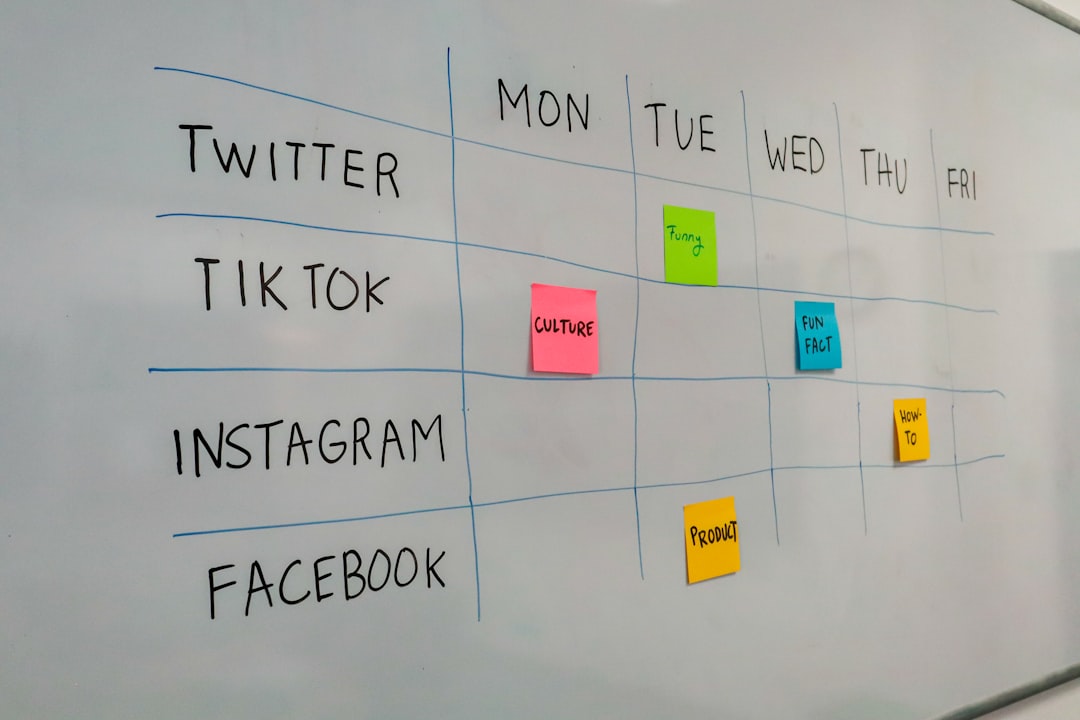
Scheduling tools often suggest the best time to post based on your audience activity. That means better reach without extra effort.
5. Analytics and Performance Tracking
Guessing does not grow accounts. Data does.
Automation tools track:
- Views
- Watch time
- Follower growth
- Engagement rates
- Click through rates
Instead of checking metrics one by one, you get clean dashboards.
You see what works fast.
If short tutorials perform well, make more. If long rants fail, adjust.
Automation turns numbers into insights.
6. AI Script Generators
Staring at a blank screen feels awful.
AI script tools help you brainstorm in seconds.
They can:
- Generate hooks
- Outline video structures
- Create storytelling formats
- Suggest call to actions
You still add your voice. Your humor. Your style.
But you never start from zero.
That speeds up production massively.
7. Comment Moderation Tools
As you grow, comments explode. That is good. But it can be overwhelming.
Automation tools can:
- Filter spam
- Block harmful words
- Highlight important messages
- Auto reply to common questions
This protects your space. It saves hours daily.
You focus on meaningful interactions instead of cleaning messes.
8. Repurposing Tools
One video. Multiple platforms.
Automation tools can resize and adapt your TikTok for:
- Instagram Reels
- YouTube Shorts
- Facebook Reels
- Pinterest Video Pins
They adjust:
- Aspect ratio
- Captions
- Length
- Formatting
This multiplies your exposure without multiplying your workload.

How to Build a Simple Automation Workflow
You do not need every tool. Start small.
Here is a beginner friendly workflow:
- Brainstorm with AI. Generate 10 video ideas.
- Script quickly. Outline key points.
- Batch record. Film everything in one session.
- Use auto editing templates.
- Add auto captions.
- Schedule for the week.
- Check analytics weekly.
That is it.
You move from chaos to system.
Mistakes to Avoid
Automation is powerful. But do not overdo it.
Avoid these common mistakes:
- Posting robotic content with no personality
- Ignoring trends because everything is pre scheduled
- Auto replying to serious comments in a generic way
- Relying only on AI without creativity
Automation supports creativity. It does not replace it.
How Automation Helps Small Creators
You do not need a big team anymore.
Automation acts like:
- A video editor
- A social media manager
- A data analyst
- A copywriter
All in one dashboard.
This levels the playing field. Small creators can compete with larger brands.
More content. Better timing. Smarter strategy.
The Future of TikTok Publishing
Content creation is becoming faster every year.
AI is improving. Tools are integrating. Workflows are smoother.
In the near future, you may:
- Generate full videos from short prompts
- Auto adapt content based on audience mood
- Predict trends before they explode
- Personalize videos for different viewer segments
The creators who embrace automation early will win.
Final Thoughts
TikTok does not reward perfection. It rewards consistency. Speed. Relevance.
Automation tools help you show up daily without burning out.
You still need ideas. You still need authenticity.
But instead of drowning in editing and scheduling, you focus on what matters.
Create. Connect. Experiment.
Let automation handle the rest.
